OrionGrant

OrionGrant
Permission and policy authorization for .NET, with no framework dependency.


Define permissions as colon-scoped hierarchies with wildcards, group them into roles, and check
whether a principal is allowed an action, either by a single permission or by a named policy. The
matching rules are pure functions you can unit-test, and the library depends only on
Microsoft.Extensions.DependencyInjection.Abstractions and Orion.Abstractions (the family's
shared contracts spine, which supplies the OrionInstrumentation telemetry base).
Part of the Orion family. Pairs naturally with OrionLedger API-key scopes (feed the issued scopes straight into a principal's permissions), and works entirely on its own.
Why
Most apps grow an ad-hoc tangle of if (user.IsAdmin || user.Roles.Contains(...)). OrionGrant
replaces that with a small, testable model:
- permissions like
orders:read, - wildcards like
orders:*, - roles that bundle permissions,
- and policies that combine requirements under a stable name.
The matcher and the authorizer are pure and synchronous, so authorization is allocation-light and trivially unit-testable, and there is no external service to stand up.
Features
- Hierarchical permissions. Colon-scoped strings (
orders:eu:write) with wildcard matching:*matches one segment in the middle, or one-or-more segments when it is the last segment. - Roles, with role-to-role inclusion. A role bundles permissions, and a role can include other roles so common bundles compose. A principal's effective set is its direct permissions unioned with the permissions of every role it holds (resolved transitively through inclusions). Unknown roles contribute nothing; inclusion cycles are rejected at registration.
- Named policies.
RequireAllneeds every listed permission;RequireAnyneeds at least one. Endpoints depend on the policy name, so you can change what it requires without touching call sites. - Explicit denies (deny-overrides).
GrantPrincipal.Deniescarries permission patterns that override any matching allow, from a role or a direct grant. - Attribute-based conditions (ABAC). A policy can carry a
GrantConditionevaluated against the principal, resource and environment attributes, AND-ed with its permission requirement. - Opt-in effective-set cache.
UseEffectiveSetCachecaches each principal's expanded grant set (bounded, least recently used out) so hot call sites do not re-expand roles on every check. - Structured denial reasons. A denial carries a
DenialReason(which permission, policy, mode, or resource was at fault) alongside the human-readable string, so callers branch on the cause rather than parsing prose. - Batch checks. Evaluate several permissions or policies for one principal in one call, expanding the effective set once for the whole batch.
- Resource / ownership-aware authorization. Object-level checks where access is granted to the
resource's owner OR to a principal holding a configured elevated permission. Holding
accounts:readis necessary but not sufficient to read an account you do not own, which closes the IDOR gap. - A clear decision type. Every check returns an
AuthorizationResultcarrying a granted flag and, on denial, a human-readable reason suitable for logging and a 403 body. - Telemetry built in. A
System.Diagnostics.Metricsmeter counts every decision, tagged by outcome and kind. - ASP.NET Core integration. The
OrionGrant.AspNetCorecompanion package runs OrionGrant checks through the framework's[Authorize]pipeline. - No framework coupling. Pure, synchronous, allocation-light. Multi-targets
net8.0,net9.0, andnet10.0.
See docs/FEATURES.md for the full breakdown of the public surface, and docs/ROADMAP.md for what is under consideration.
Install
dotnet add package OrionGrant
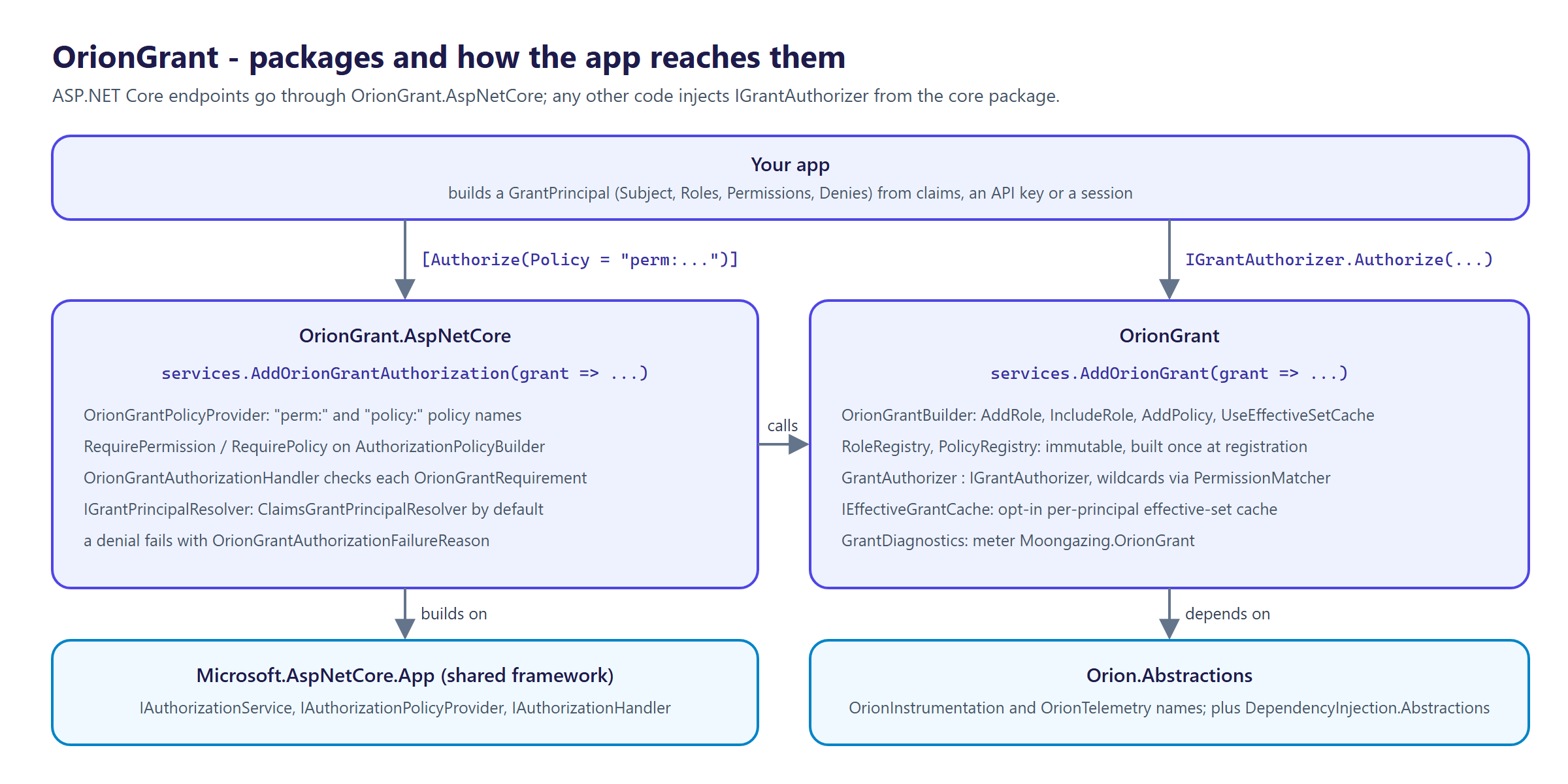
For ASP.NET Core, the companion package bridges OrionGrant to the built-in [Authorize] pipeline:
dotnet add package OrionGrant.AspNetCore
It adds AddOrionGrantAuthorization plus RequirePermission(...) / RequirePolicy(...) extensions on AuthorizationPolicyBuilder, and an IAuthorizationHandler / policy-provider bridge, so an OrionGrant permission check is enforced through the standard [Authorize] pipeline. See ASP.NET Core.
| Package | What it is |
|---|---|
OrionGrant | IGrantAuthorizer, GrantAuthorizer, GrantPrincipal, PermissionMatcher, roles, policies, denial reasons, GrantDiagnostics and AddOrionGrant. Depends on Microsoft.Extensions.DependencyInjection.Abstractions and Orion.Abstractions. |
OrionGrant.AspNetCore | AddOrionGrantAuthorization, OrionGrantPolicyProvider, OrionGrantAuthorizationHandler, IGrantPrincipalResolver and the RequirePermission / RequirePolicy extensions. Depends on OrionGrant and the Microsoft.AspNetCore.App shared framework. |
Quick start
Register roles and policies once at startup:
builder.Services.AddOrionGrant(grant => grant
    .AddRole("orders.manager", "orders:*")
    .AddRole("auditor", "orders:read", "billing:read")
    .AddPolicy("orders.write", PolicyMode.RequireAll, "orders:write")
    .AddPolicy("orders.touch", PolicyMode.RequireAny, "orders:read", "orders:write"));
Inject IGrantAuthorizer and check a permission or a policy:
public sealed class OrderService(IGrantAuthorizer authorizer)
{
    public void Update(GrantPrincipal caller, Order order)
    {
        var decision = authorizer.AuthorizePolicy(caller, "orders.write");
        if (!decision.IsGranted)
        {
            // FailureReason says why, ready for a log line or a 403 body.
            throw new UnauthorizedAccessException(decision.FailureReason);
        }
        // ...
    }
}
A denial is a returned AuthorizationResult, never an exception from OrionGrant; what to do with it
(throw, return 403, log) is the caller's choice. In ASP.NET Core, let [Authorize] do it (see
ASP.NET Core).
A principal is just a subject plus the roles and direct permissions it carries (build it from your API key, JWT claims, or session):
var caller = new GrantPrincipal
{
    Subject = apiKey.Id,
    Roles = apiKey.Roles,
    Permissions = apiKey.Scopes,   // e.g. straight from OrionLedger
};
Usage
Permission matching
Permissions are colon-separated. A * segment matches one segment in the middle, or one-or-more
segments when it is last:
| Granted | Covers | Does not cover |
|---|---|---|
orders:read | orders:read | orders:write, orders:read:detail |
orders:* | orders:read, orders:read:detail | orders, billing:read |
orders:*:read | orders:eu:read | orders:eu:write |
* | everything | nothing |
The rules live in the static, pure PermissionMatcher, so you can use them directly without the DI
container or an authorizer:
PermissionMatcher.IsGranted("orders:*", "orders:read");                 // true
PermissionMatcher.IsGrantedByAny(["billing:read", "orders:*"], "orders:write"); // true
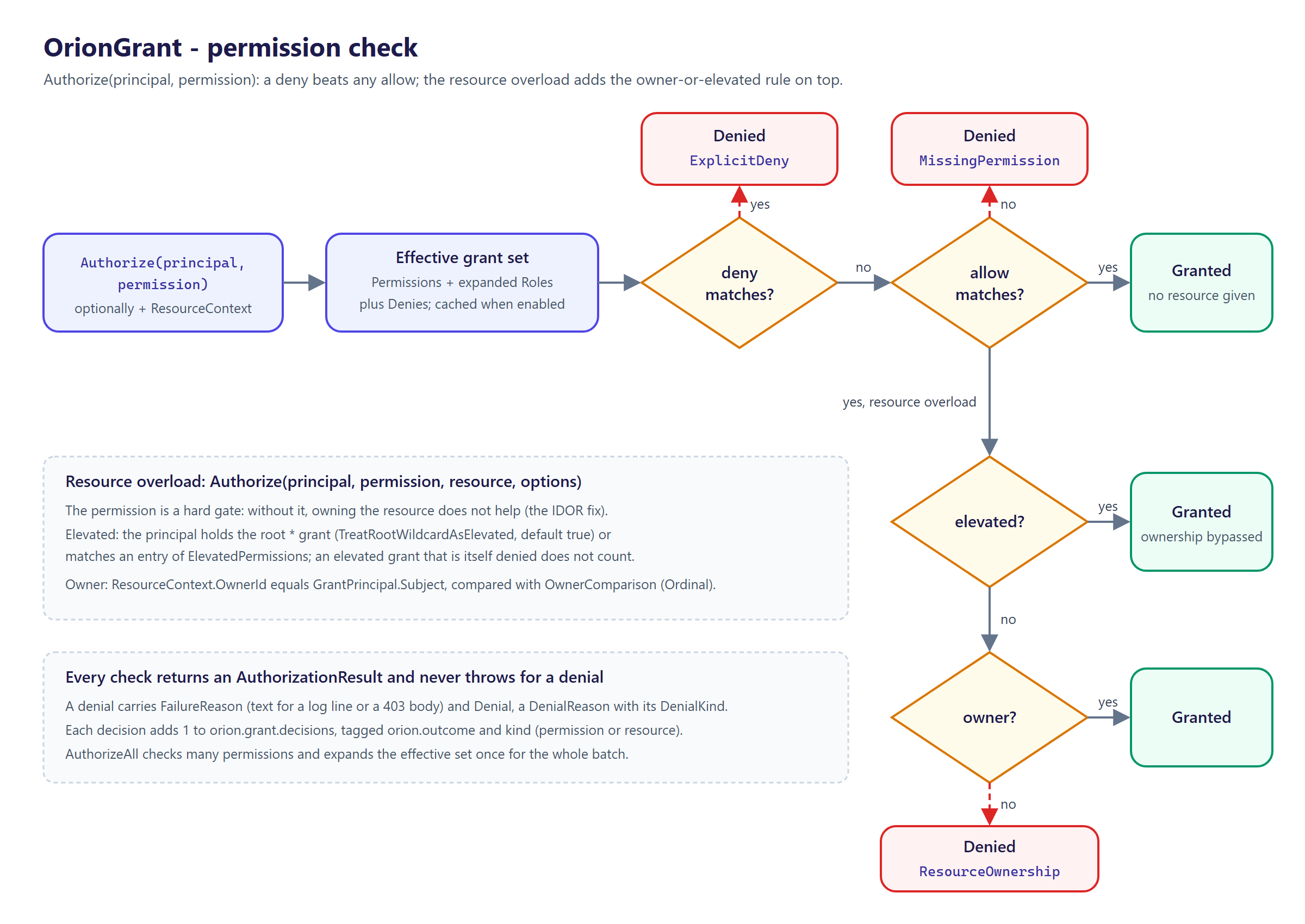
IGrantAuthorizer.Authorize runs a permission check against the principal's effective set:
Roles
A role bundles permissions. The authorizer expands every role a principal holds and unions the
results with the principal's direct permissions to get the effective set. Calling AddRole again
for the same name adds to that role's permission set rather than replacing it:
builder.Services.AddOrionGrant(grant => grant
    .AddRole("support", "tickets:read")
    .AddRole("support", "tickets:comment"));   // support now grants both
You can inspect the effective set for a principal directly:
IReadOnlySet<string> effective = authorizer.EffectivePermissions(caller);
A role can also include other roles, so common bundles compose instead of being repeated. Inclusion is transitive and resolved once at registration; the effective set a principal gets from a role already contains every permission reachable through its inclusions:
builder.Services.AddOrionGrant(grant => grant
    .AddRole("reader", "orders:read")
    .AddRole("editor", "orders:write")
    .AddRole("admin",  "orders:delete")
    .IncludeRole("editor", "reader")    // editor now also grants orders:read
    .IncludeRole("admin",  "editor"));  // admin grants orders:delete, orders:write, orders:read
Inclusion edges that form a cycle (a role that includes itself directly or transitively) are
rejected when the registry is built, with a RoleInclusionCycleException naming the cycle, so a
misconfiguration fails fast at startup rather than looping during a request.
Explicit denies
GrantPrincipal.Denies lists permission patterns the principal must not have, whatever its roles or
direct grants say. A deny uses the same wildcard matching as a grant and always wins
(deny-overrides):
var contractor = new GrantPrincipal
{
    Subject = "u7",
    Roles = ["orders.manager"],          // grants orders:*
    Denies = ["orders:delete"],
};

authorizer.Authorize(contractor, "orders:read").IsGranted;     // true
authorizer.Authorize(contractor, "orders:delete").IsGranted;   // false - DenialKind.ExplicitDeny
EffectivePermissions still returns the allow set only; denies are applied when a check runs. A
deny also beats ownership and elevated grants in the resource-aware check.
Policies: RequireAll and RequireAny
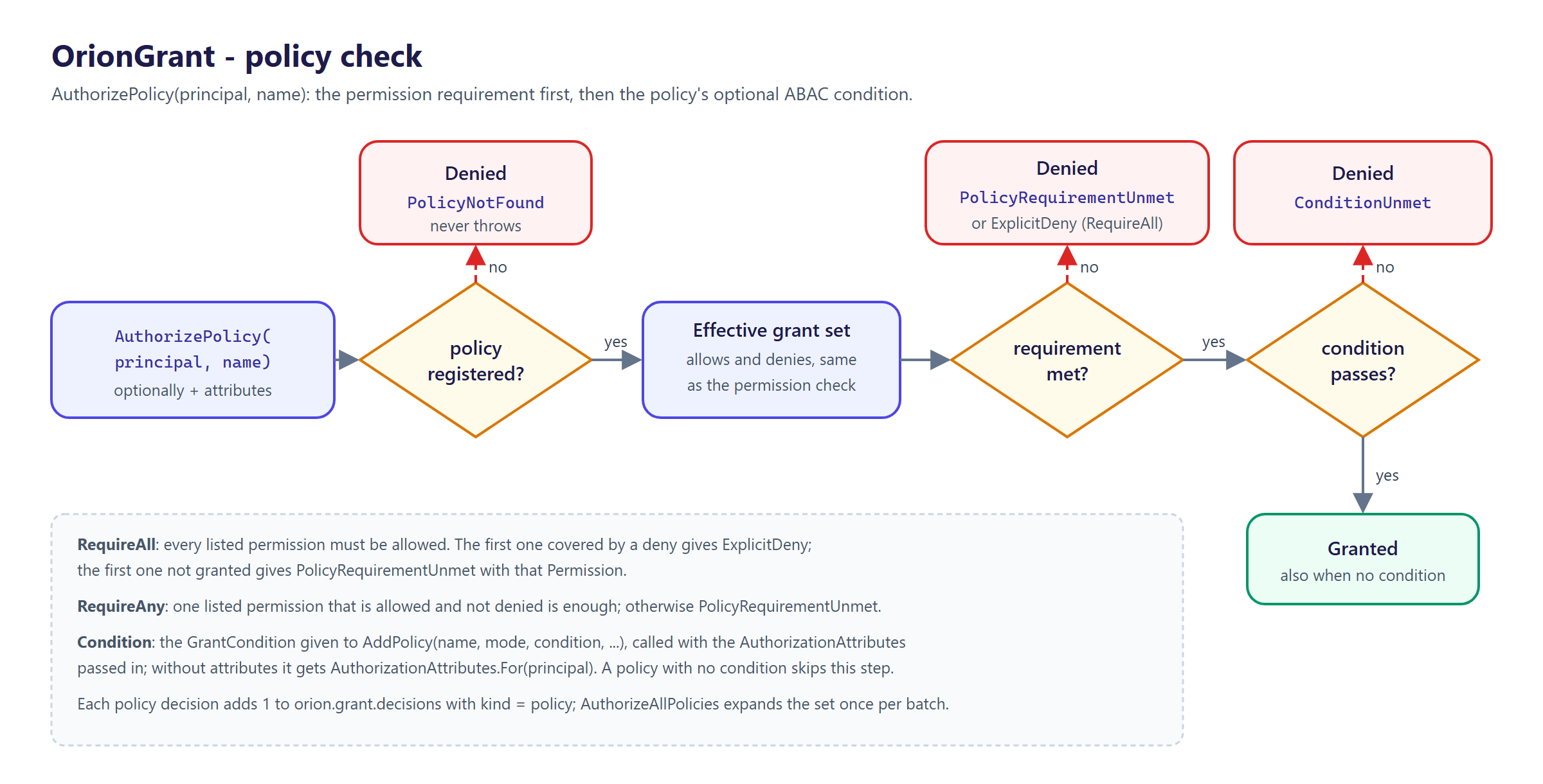
A policy is a named requirement evaluated against the principal's effective permissions:
PolicyMode.RequireAllgrants only when every listed permission is satisfied.PolicyMode.RequireAnygrants when at least one is satisfied (it short-circuits on the first match).
builder.Services.AddOrionGrant(grant => grant
    .AddPolicy("orders.manage", PolicyMode.RequireAll, "orders:read", "orders:write")
    .AddPolicy("orders.touch", PolicyMode.RequireAny, "orders:read", "orders:write"));

var manage = authorizer.AuthorizePolicy(caller, "orders.manage");
var touch  = authorizer.AuthorizePolicy(caller, "orders.touch");
Each listed permission is checked through the same wildcard matcher, so a principal holding
orders:* satisfies a policy that lists orders:read and orders:write. An unknown policy name is
denied with a reason rather than throwing.
Attribute-based conditions (ABAC)
A policy can also carry a GrantCondition, a predicate over AuthorizationAttributes (the
principal, an optional ResourceContext, and an environment dictionary). The permission requirement
is checked first; the condition is an extra AND gate:
builder.Services.AddOrionGrant(grant => grant
    .AddPolicy(
        "orders.edit-own",
        PolicyMode.RequireAll,
        attributes => attributes.Resource?.OwnerId == attributes.Principal.Subject
            && attributes.Env("region") == "eu",
        "orders:write"));

var attributes = new AuthorizationAttributes(
    caller,
    ResourceContext.OwnedBy("u1"),
    new Dictionary<string, string?> { ["region"] = "eu" });

var decision = authorizer.AuthorizePolicy(caller, "orders.edit-own", attributes);
A failed condition is denied with DenialKind.ConditionUnmet. Calling the two-argument
AuthorizePolicy on a policy with a condition evaluates it against
AuthorizationAttributes.For(caller) (the principal only, no resource, no environment).
Resource and ownership-aware authorization
A permission check answers "may this principal read accounts?". It does not answer "may this
principal read this account?". Granting accounts:read to every caller and reading whatever id
arrives is the classic IDOR (Insecure Direct Object Reference) bug: one user reads another user's
row by changing a number in the URL.
The resource-aware overload closes that gap. The principal must hold the permission AND either own the resource or hold a configured elevated grant. Holding the permission alone is necessary but not sufficient:
// account 42 is owned by u1; the owner id is what gets compared to the principal subject.
var account = new ResourceContext(ownerId: "u1", resourceType: "account", resourceId: "42");

var owner    = new GrantPrincipal { Subject = "u1", Permissions = ["accounts:read"] };
var stranger = new GrantPrincipal { Subject = "u2", Permissions = ["accounts:read"] };

authorizer.Authorize(owner,    "accounts:read", account).IsGranted;   // true  - holds it and owns it
authorizer.Authorize(stranger, "accounts:read", account).IsGranted;   // false - holds it but does not own it
ResourceContext.OwnedBy("u1") is a shorthand when only the owner identity matters. The optional
resourceType and resourceId are not used in the decision; they are carried for logging and
diagnostics so a denial can be traced to a concrete resource.
The "owner OR elevated" pattern lets privileged callers bypass ownership. Configure it per call with
ResourceAuthorizationOptions:
var options = new ResourceAuthorizationOptions
{
    ElevatedPermissions = ["accounts:read:any"],   // any caller granted this bypasses ownership
};

var support = new GrantPrincipal { Subject = "svc-support", Permissions = ["accounts:read", "accounts:read:any"] };
authorizer.Authorize(support, "accounts:read", account, options).IsGranted;   // true - elevated bypass
Elevated permissions are matched through the same wildcard matcher as everything else.
OwnerComparison controls how the subject and owner id are compared (StringComparison.Ordinal by
default, matching the rest of the library). TreatRootWildcardAsElevated is on by default, so a
principal holding the root * grant bypasses ownership with no per-call configuration:
var admin = new GrantPrincipal { Subject = "svc-admin", Permissions = ["*"] };
authorizer.Authorize(admin, "accounts:read", account).IsGranted;   // true - root bypasses ownership
The overload is a default interface method on IGrantAuthorizer, so existing implementors keep
compiling. Resource-aware decisions are recorded on the orion.grant.decisions counter with
kind=resource.
Structured denial reasons
Every denial still carries a human-readable FailureReason for logging and a 403 body. A denial
also carries a structured DenialReason so a caller can branch on the cause instead of parsing the
string. DenialReason.Kind is one of MissingPermission, PolicyNotFound,
PolicyRequirementUnmet, ResourceOwnership, ExplicitDeny, or ConditionUnmet, and the relevant
identifiers are populated alongside it:
var decision = authorizer.AuthorizePolicy(caller, "orders.manage");
if (!decision.IsGranted && decision.Denial is { } denial)
{
    switch (denial.Kind)
    {
        case DenialKind.PolicyNotFound:
            // denial.PolicyName is the unknown policy.
            break;
        case DenialKind.PolicyRequirementUnmet:
            // denial.PolicyName, denial.PolicyMode, and (for RequireAll) denial.Permission.
            break;
        case DenialKind.MissingPermission:
            // denial.Permission is the permission that was not granted.
            break;
        case DenialKind.ResourceOwnership:
            // denial.Permission was held; denial.ResourceType / denial.ResourceId echo the resource.
            break;
        case DenialKind.ExplicitDeny:
            // denial.Permission was required; denial.DenyPattern is the deny that blocked it.
            break;
        case DenialKind.ConditionUnmet:
            // denial.PolicyName is the policy whose ABAC condition returned false.
            break;
    }
}
The structured cause is additive: FailureReason is unchanged, and the back-compatible
AuthorizationResult.Denied(string) overload still produces a result with a null Denial.
Batch checks
Check several permissions or policies for one principal in a single call. The authorizer expands the
principal's effective set once for the whole batch instead of once per requirement, and returns one
BatchAuthorizationResult per requirement in input order:
IReadOnlyList<BatchAuthorizationResult> results = authorizer.AuthorizeAll(
    caller, ["orders:read", "orders:write", "billing:read"]);

foreach (var result in results)
{
    Console.WriteLine($"{result.Requirement}: {(result.IsGranted ? "granted" : "denied")}");
}

// Policies work the same way.
var policyResults = authorizer.AuthorizeAllPolicies(caller, ["orders.manage", "orders.touch"]);
Each item produces exactly the result the equivalent single call would, including its structured
denial, and records one decision on the meter, so a batch of N is equivalent to N single calls but
pays for the effective-set expansion only once. AuthorizeAll and AuthorizeAllPolicies are default
interface methods, so existing IGrantAuthorizer implementors keep compiling.
Configuration
Everything is wired through AddOrionGrant. The configure callback is optional; calling
AddOrionGrant() with no arguments registers a working authorizer with no roles or policies
defined.
| Registered service | Lifetime | Notes |
|---|---|---|
IGrantAuthorizer | Singleton | The entry point for all checks. |
RoleRegistry | Singleton | Immutable role-to-permissions map, built once from the builder. |
PolicyRegistry | Singleton | Immutable name-to-policy map, built once from the builder. |
GrantDiagnostics | Singleton | Owns the metrics meter; disposed with the container. |
IEffectiveGrantCache | Singleton | Only when UseEffectiveSetCache is called. |
Registrations use TryAdd, so you can register your own implementation of any of these before
calling AddOrionGrant and it will be respected. Roles and policies are resolved once at
registration into immutable registries, so configuration is read at startup, not per request.
Effective-set cache
By default every check expands the principal's roles again. A call site that checks the same principal many times can turn on a bounded cache of expanded grant sets:
builder.Services.AddOrionGrant(grant => grant
    .AddRole("orders.manager", "orders:*")
    .UseEffectiveSetCache(capacity: 4096));   // default capacity 1024
The cache key is the principal's role, permission and deny membership, and role contents are fixed at startup, so a principal whose roles change gets a new key and never a stale decision. When the cache is full the least recently used entry is evicted.
ASP.NET Core
OrionGrant.AspNetCore registers OrionGrant and bridges it to the framework's authorization:
builder.Services.AddOrionGrantAuthorization(grant => grant
    .AddRole("orders.manager", "orders:*")
    .AddPolicy("orders.write", PolicyMode.RequireAll, "orders:write"));

builder.Services.AddAuthorization(options =>
    options.AddPolicy("CanReadOrders", policy => policy.RequirePermission("orders:read")));

app.MapGet("/orders", () => "...").RequireAuthorization("CanReadOrders");
app.MapPut("/orders/{id}", (int id) => "...").RequireAuthorization("policy:orders.write");
OrionGrantPolicyProvider turns any policy name starting with perm: into a permission check and
policy: into an OrionGrant policy check, so [Authorize(Policy = "perm:orders:read")] works without
registering a policy per permission. Other names go to the framework's default provider. The
prefixes live in OrionGrantPolicyNameOptions (PermissionPrefix, PolicyPrefix).
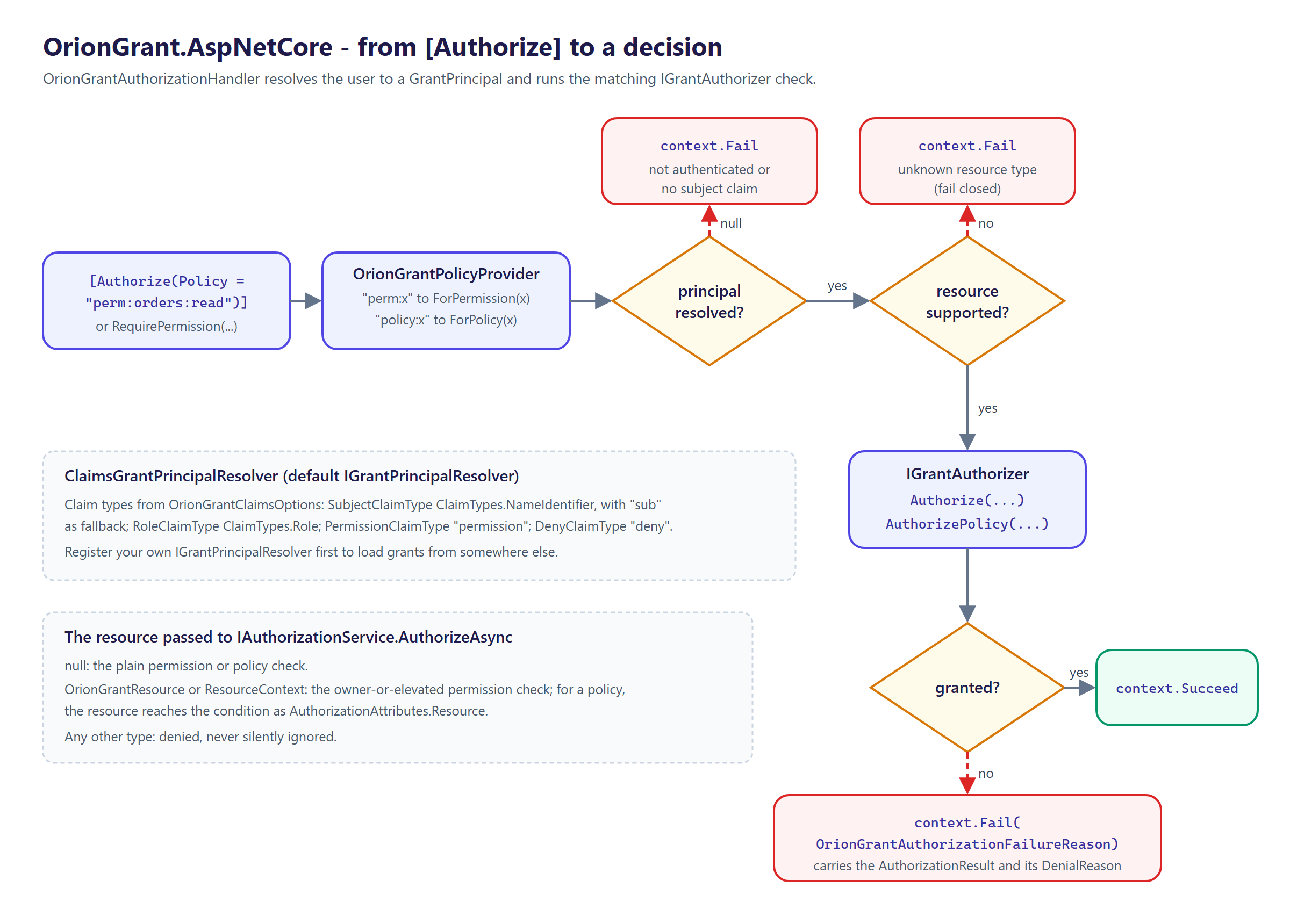
The default ClaimsGrantPrincipalResolver builds the GrantPrincipal from claims, with claim types
from OrionGrantClaimsOptions:
| Option | Default | Read into |
|---|---|---|
SubjectClaimType | ClaimTypes.NameIdentifier, then sub | Subject |
RoleClaimType | ClaimTypes.Role | Roles |
PermissionClaimType | permission | Permissions |
DenyClaimType | deny | Denies |
An unauthenticated user, or one without a subject claim, is denied. Register your own
IGrantPrincipalResolver before AddOrionGrantAuthorization to load grants from somewhere else.
For object-level checks, pass an OrionGrantResource (or a bare ResourceContext) as the resource
to IAuthorizationService.AuthorizeAsync(user, resource, requirement). Any other resource type is
denied (fail closed). A denial fails the context with an OrionGrantAuthorizationFailureReason
that carries the full AuthorizationResult and its DenialReason.
Telemetry
GrantDiagnostics exposes a System.Diagnostics.Metrics meter named Moongazing.OrionGrant
(also available as GrantDiagnostics.MeterName). It publishes one counter:
orion.grant.decisions(unit{decision}) taggedorion.outcome(granted/denied) andkind(permission/policy/resource).
new GrantDiagnostics(instanceTag) adds an orion.instance tag on the meter, so listeners can tell
several instances in one process apart.
Subscribe to it from OpenTelemetry like any other meter:
builder.Services.AddOpenTelemetry()
    .WithMetrics(metrics => metrics.AddMeter(GrantDiagnostics.MeterName));
Testing
The matcher and the authorizer are pure and synchronous, so unit tests need no mocks and no host.
Construct a GrantAuthorizer directly from its registries, or drive PermissionMatcher on its own:
var policies = new PolicyRegistry(new Dictionary<string, AccessPolicy>
{
    ["orders.manage"] = new("orders.manage", PolicyMode.RequireAll, ["orders:read", "orders:write"]),
});

using var diagnostics = new GrantDiagnostics();
var authorizer = new GrantAuthorizer(RoleRegistry.Empty, policies, diagnostics);

var full = new GrantPrincipal { Subject = "u1", Permissions = ["orders:*"] };
Assert.True(authorizer.AuthorizePolicy(full, "orders.manage").IsGranted);
The repository's own test suite (xUnit) lives in tests/. There is also a BenchmarkDotNet suite in
benchmarks/ covering the matcher, the authorizer, and the one-time registration path; see
benchmarks.md. No measured numbers are committed; collect your own on the hardware
you care about.
Versioning
OrionGrant follows Semantic Versioning. The current line is 0.6.0
(pre-1.0): the public API may still change between minor versions while the design settles. The
library multi-targets net8.0, net9.0, and net10.0, builds with TreatWarningsAsErrors,
nullable reference types enabled, and latest-recommended analyzers. See CHANGELOG.md
for release notes.
Contributing
Issues and pull requests are welcome. Please read CONTRIBUTING.md and the Code of Conduct before opening one.
More from the Orion family
OrionGrant is one of a set of standalone .NET libraries:
- OrionGuard - guard clauses and validation.
- OrionLedger - API-key issuance and scopes.
License
This project is licensed under the MIT License.
Author
Tunahan Ali Ozturk - GitHub
Packages
| Package | Version | Downloads |
|---|---|---|
| OrionGrant | 0.6.0 | 1,115 |
| OrionGrant.AspNetCore | 0.6.0 | 290 |